
Employee self-service portal · My Image New
Everything about the employee, on a single page
Leave, today's schedule, the contract, the team and personal data, explained plainly, with no specialist menus. Employees find the answer themselves, request leave in seconds and stop emailing HR for every question.
For every employee
Answers, not admin screens
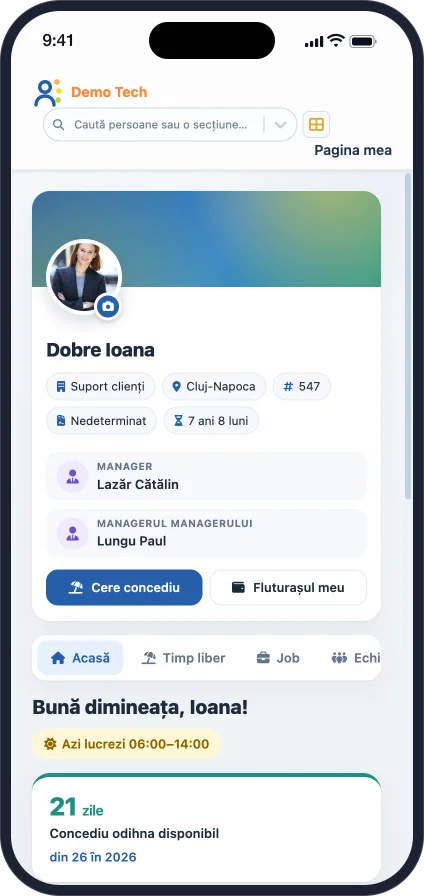
My Image is designed for people who open the platform a few times a month. The page greets them by name, shows today's schedule and puts what they usually look for up front.
Home
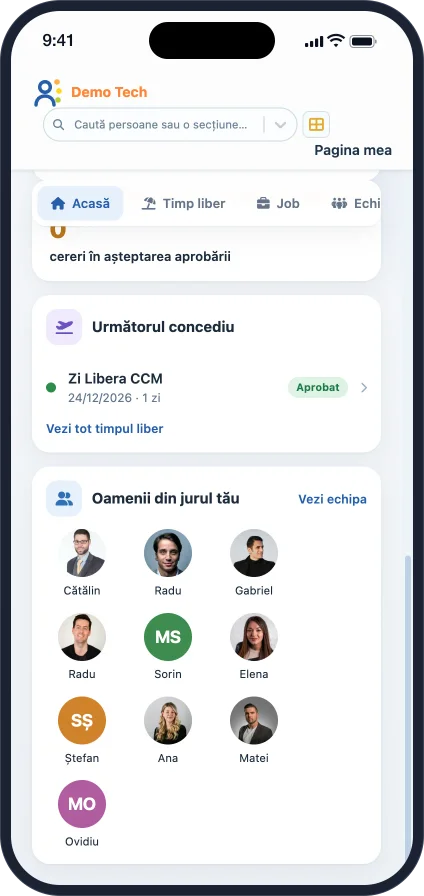
Today's schedule, available leave days, how many days until the next leave, requests waiting for approval and the people around them.
Time off
Balances for each leave type, their own requests with status and approval history, and the full monthly timesheet, as in TimeImage.
Job
The current position and their personal history: contracts, positions and employment, on an easy-to-read timeline.
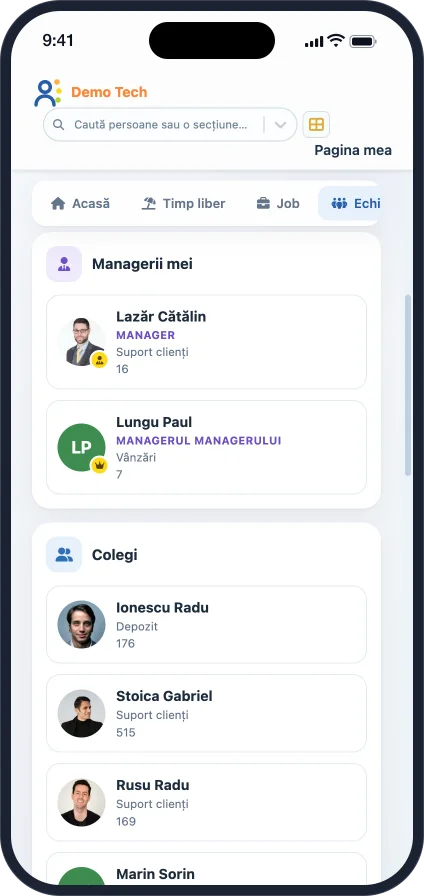
Team
The direct manager and that manager's manager, teammates and an org chart with details on hover.
Personal
Personal and family data, with the same fields and labels you configured in HR Manager for your company.
For managers
Who in the team is away today and the requests waiting for approval, opened and approved straight from the page.
Leave and requests
From balance to submitted request in seconds
The "Request leave" button opens the TimeImage form, with your company's absence types, rules and approval workflow. Employees follow their request until it is approved and can cancel it while it is still pending.
- The balance of every leave type: allocated, used and available
- Each request opens with its period, duration, comment and approval history
- If the company hides the balance on the home page, My Image follows the same setting
Team and organisation
Who's who, with the team's faces
Especially for new joiners, the org chart and the photo cards shorten the first weeks. Everyone sees their managers, their teammates and where they sit in the structure.
- Direct and line manager, each with their department
- A colourful org chart, with each person's details on hover
- If the company does not use the management hierarchy, the section simply does not appear
For managers
Your team, today and in detail
Managers also see who is away today and what is waiting for their approval. A request opens straight from the list and is approved or rejected with the actions and confirmations from TimeImage.
- "My team today": today's absences and the requests to approve
- Every team member, with department and badge number
- Manager cards only appear for people who actually manage someone
On the phone
The same page, straight from the phone's browser
My Image fits itself to the small screen, with nothing to install. For everyday TimeImage actions we are also preparing the IQHR mobile app.
Configurable and secure
The same data and the same rules as the rest of the platform
My Image keeps no separate copy of the data and no access rules of its own. It shows what HR Manager and TimeImage send it, with the permissions of the person looking.
Permission on every section
Every tab and card is a component with its own access right, granted to users, groups or roles. The server checks the right on every request.
Only what you have enabled
Without TimeImage, the time sections do not appear. Without a management hierarchy, there is no org chart. Nothing empty, nothing that errors.
Sensitive values hidden
Salary, personal ID number, date of birth or IBAN show as dots. Employees reveal them one at a time, with a button, only when they need to.
Your fields
The personal sections use the HR Manager configuration: the same fields, labels and value lists you have already defined.
Employees only
The module appears only for accounts linked to an active employee. Technical or admin accounts do not see it.
Romanian and English
The same top bar as the other HRImage applications, with the language and date format each user chooses.
Personalised demo, no commitment
See the platform running on your company's processes
We show you the relevant modules, configured on an example close to your organisation: approval workflows, permissions, reports and integrations.